Never get lost in Eclipse again!
Whether you are an Eclipse veteran or beginner, there will be times when you want to access a certain functionality but you can’t remember exactly where to find it.
This is where Control-3 (or ⌘-3 on Mac) comes in handy.
For example, if I want to modify the Java formatting options, I press this combination and then the first letters of “formatter:”
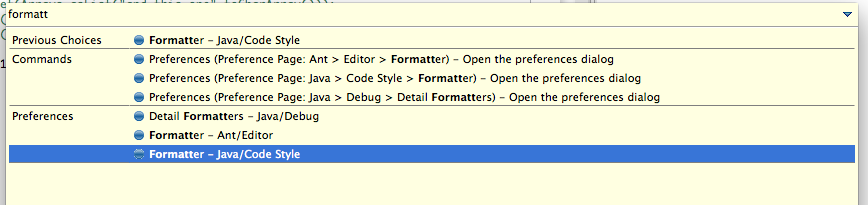
As you can see, every single functionality in Eclipse that contains the letters “formatt” is displayed, and the one I’m looking for is displayed at the bottom. I select it, and:
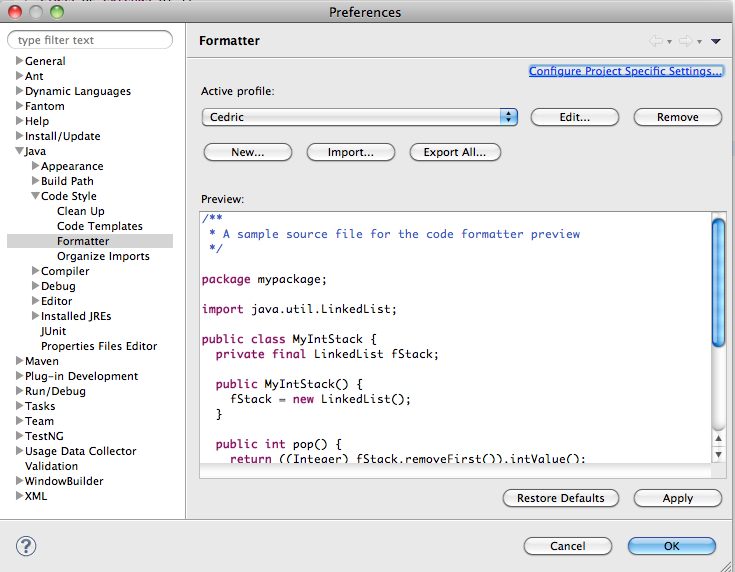
Remember this shortcut next time you get lost in Eclipse!
Comments (6)
Great tip. I put a sticky note on my monitor and labeled it "eclipse apropos" because it's just like the old emacs apropos command. (Apologies to current emacs fans for using the adjective "old" on emacs; for me it's old.)
[Ctrl] [3] On windows, nice shortcut. An other shortcut which is also really usefull is Crtl+Shift+L. This give a list of all key binding currently available.
Thanks for the eclipse tips and tricks. Keep them coming !
Ctrl-3 is good. I just wish it was great, and by that I basically mean faster. But what I really want is to make scriptable commands a la emacs, and while this isn't that, it just reminds me of what's missing. Dominique, Ctrl-Shift-L is useful, but I can't figure out how to easily navigate all the information in the popup. How do you manage?
Awesome! Thanks for the tip.
Eclipse is definitely a tool i use for programming just because its the most useful program used to code with all the different languages. This is definitely a useful tip. I never knew about this function for eclipse just because I would just use the basics. Thank you! This is going to be used worth while and it'll save me tons of time!