Java2Html
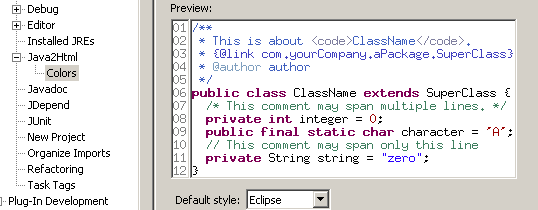
I just discovered Java2Html.
There are many code highlighters that let you take code snippets and include them in HTML pages while preserving their colors, but they all suffer from two problems:
- They are Web-based (you need to copy/paste your code to the form, submit, get the result back and paste it in your HTML file).
- They are CSS-based, which forces your HTML page to include that CSS file as well.
Interestingly, this is one of the rare cases where separating style and content, as enabled by CSS, is an annoyance.
Java2Html solves these two problems by:
- Providing an Eclipse plug-in (and also a standalone Swing application if you prefer), therefore allowing you to do everything from Eclipse.
- Embedding font information directly in the HTML generated (no CSS), so that it’s really a matter of copy/pasting the code as it is into your HTML pages (and Java2Html lets you either put the generated code in the clipboard or in a file).
Simple and effective.
Comments (7)
Hi Cedric, you might want to look at JHighlight too: https://jhighlight.dev.java.net/ I started with this since I couldn't find a small highlighting library in pure Java that supports multiple languages and is easily extensible and embeddable. You can even use it as a servlet filter to perform on-the-fly highlighting. Best regards, Geert
Hi Cedric, you might want to look at JHighlight too: https://jhighlight.dev.java.net/ I started with this since I couldn't find a small highlighting library in pure Java that supports multiple languages and is easily extensible and embeddable. You can even use it as a servlet filter to perform on-the-fly highlighting. Best regards, Geert
One thing I always liked about Eclipse was that copy-paste saved the highlighting and was usually enough when I pasted into rich editor like Word or Dreamweaver.
Great to point us to that tool... I have been looking for something like that for a while. Thanks.
Hi Cedric, I fire up my jEdit to do java/javascript/ruby to HTML conversion. There's also an opensource tool that converts .java(among others) to .HTML in batch mode code2html -- http://www.palfrader.org/code2html/. HAPPY NEW YEAR! BR, ~A
I know Eclipse is your cup of tea, but if you use IDEA you will find 'Copy as HTML' to be quite nice. A sample of output is on one of my recent posts: (I tried including the link, but the form rejects it for containing 'b*l*o*g*s*p*o*t' without the asterisks. Hrm.) http://binkley.b*l*o*g*s*p*o*t.com/2006/01/more-enum-reinvention-in-java.html Cheers, --binkley
Check this one: htmlSave. http://eclipse.moelleryoung.com/htmlsave/index.php I think it's better (it just grabs current editor). I usually have to modify generated code (not xhtml), but it's good enough.